Add Services
The Onboard Developer process so far is a lot of manual work. Trainink has a couple of services in place that can help to automate the next part of the process, which is about granting roles to developers.
New Tasks
There are two steps needed for this part. Add two service tasks to the end of the model:
-
Determine Roles
-
Grant Roles
Open the properties for both tasks in turn.
Find the Implementation section and choose the Expression type.
For now, just add true as the expression.
For the Determine Roles task, also fill in the Result variable field as shown below.
With an expression implementation, the task would normally return the roles, to be set as a process variable and to be used by the next task, Grant Roles.
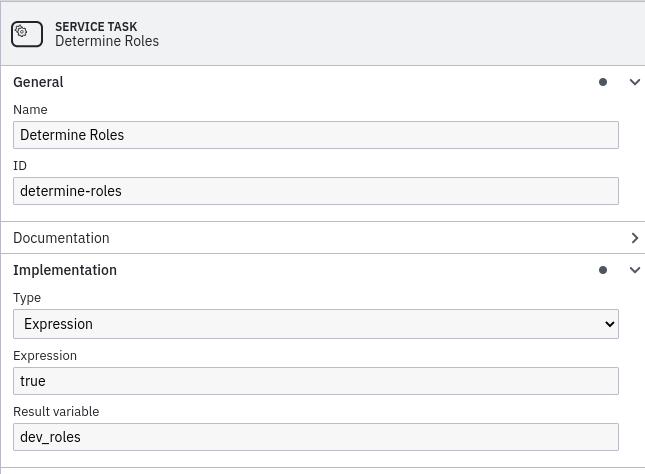
trueThe implementation expression true causes Camunda to simply pass through the implementation of the service task when it arrives there.
This can be very useful for initial testing purposes.
Save your work on the model with or Ctrl+S
Deploy your updated model to the process engine with the 🚀 button and start a new process instance from Tasklist.
Complete the user tasks of new instance and see what happens in Cockpit: the process is completed, because the service tasks were completed.
Connect the Dots
Passthrough service task implementations are a first step, but you need to connect to actual services to automate the process. Let’s connect the dots.
In the workspace you’ll find a services folder, with subfolders for the Determine Roles and Grant Roles services. These services can be implemented as NodeJS services for the service tasks in the process.
Open the index.js file for the determine-roles service.
Copy the code fragment below into the file and save it.
import { Client, Variables, logger } from "camunda-external-task-client-js";

const config = { baseUrl: "http://localhost:8080/engine-rest", use: logger };

const client = new Client(config);

client.subscribe("determine-roles", async function({ task, taskService }) {
  const dev_prod_support = task.variables.get("dev_prod_support");
  const dev_name = task.variables.get("dev_name");

  const roles = [];
  roles.push("IssueTracker: user");
  roles.push("VersionControl: developer");
  roles.push("VersionControl: admin");
  roles.push("DeploymentPipeline: deploy");

  if (dev_prod_support) {
    roles.push("ProdAccess: third-line-support");
  }

  const processVariables = new Variables();
  processVariables.set("dev_roles", roles);

  console.log(logger.success("Determined " + roles.length + " Roles for " + dev_name));
  await taskService.complete(task, processVariables);
});
You don’t need to understand all of the details of the implementation, but as you can probably see at a glance, the service creates an array of roles and adds a number of fixed elements to it.
Depending on the process variable dev_prod_support, which is populated when the process starts, it also adds an optional element.
The values are simple strings here, assuming the Grant Roles task knows how to parse them and grant the roles in some backend system.
The roles are returned in a new process variable, dev_roles.
Now open the index.js file for the grant-roles service.
Copy the code fragment below into the file and save it.
import { Client, Variables, logger } from "camunda-external-task-client-js";

const config = { baseUrl: "http://localhost:8080/engine-rest", use: logger };

const client = new Client(config);

client.subscribe("grant-roles", async function({ task, taskService }) {
  const dev_name = task.variables.get("dev_name");
  const dev_roles = task.variables.get("dev_roles");

  console.log(logger.success("Granting Roles to " + dev_name));

  for (let i = 0; i < dev_roles.length; i++) {
    console.log(logger.success("  Granted Role: " + dev_roles[i]));
  }

  console.log(logger.success("Granted Roles to " + dev_name));

  await taskService.complete(task);
});
This implementation simulates taking each of the roles determined and granting them in some backend system.
We need to update the process to use these services.
Head back to Camunda Modeler and the process model.
Select the tasks in turn and change the Implementation properties.
Select a type of External and fill the topic fields with these respective values:
-
determine-rolesfor the Determine Roles task -
grant-rolesfor the Grant Roles task
Save the updated process model and deploy it to Camunda. Open the Tasklist part of the Camunda webapp and start a new process instance for Onboard Developer. Complete the user tasks as before, without paying much attention to the task actions. Inspect the process state in Cockpit. The process is waiting at Determine Roles. But why didn’t the process execute the services?
We implemented the services and connected them in the Camunda model. The new model was deployed and an instance started. What we didn’t do, however, was to start the services! Let’s do that to help the process continue.
Open separate windows of your terminal application for each of the services in the services folder and change into their directory (with cd or dir).
Install the NodeJS dependencies first.
$ npm install
Run the services with the following command.
$ node index.js
If all is well, you’ll see output immediately, as they process the tasks in Camunda. Start another instance of the process and try the opposite option for the production support field. Check that the services log different information for the roles in the second process instance.
Well done, another part is implemented!